git diff answers a simple question—what changed?—but the correct command depends on which two states you want to compare. This cheat sheet starts with the commands used most often, then covers output options that make a diff easier to review or share.
The mental model
Keep these three states in mind:
- working tree: files currently on disk
- index: changes staged by
git add - HEAD: the commit currently checked out
Plain git diff compares the working tree with the index. It does not show staged changes.
Everyday Git diff commands
Show unstaged changes
git diffCompares the working tree with the index.
Show staged changes
git diff --cachedgit diff --staged is an equivalent spelling.
Show all uncommitted changes
git diff HEADCompares the working tree, including staged and unstaged changes, with HEAD.
Show the latest commit
git diff HEAD~1 HEADFor a commit-centric view with its message and metadata, git show HEAD is often more convenient.
Compare two commits
git diff <older-commit> <newer-commit>Example:
git diff a1b2c3d e4f5a6bCompare two branches directly
git diff main featureThis compares the tips of the two branches. Changes that landed on main after the branch split can appear in the output.
Review what a branch introduced
git diff main...featureThe three-dot form compares the merge base of the branches with feature. This is usually the most useful command for reviewing the work introduced on a feature branch.
Limit the diff
One file
git diff -- src/server.tsThe -- separates revisions and options from paths, which prevents ambiguous filenames from being interpreted as revision names.
One directory
git diff main...HEAD -- apps/web/Multiple paths
git diff -- package.json pnpm-lock.yamlExclude generated files
git diff -- . ':(exclude)dist/**' ':(exclude)*.snap'Quote pathspecs so the shell does not expand them before Git sees them.
Make the output easier to read
Show a compact summary
git diff --statShow only changed filenames
git diff --name-onlyShow the change status
git diff --name-statusThe leading letter identifies added, modified, deleted, renamed, copied, and other change types.
Highlight changed words
git diff --word-diffFor terminal-friendly color without inline markers:
git diff --color-wordsIgnore whitespace-only changes
git diff -wUse this carefully. Ignoring whitespace can hide meaningful changes in indentation-sensitive languages.
Detect renames and copies
git diff -M -C-M enables rename detection and -C enables copy detection. Git often detects renames automatically, but explicit flags are useful when tuning a review.
Create an applyable patch that includes binary changes
git diff --binary main...HEAD > feature-review.patchOrdinary diff output only reports that binary files differ. --binary includes Git’s binary patch data so git apply can reproduce the change. The binary portion is for transport, not human review.
Use a different diff algorithm
git diff --histogramHistogram often produces clearer hunks for code with repeated lines. Other options include --patience, --minimal, and --diff-algorithm=myers.
Inspect whether a specific change happened
Find commits where a string’s count changed
git log -S'functionName' -pThis is the “pickaxe” search: it finds commits that add or remove occurrences of the string.
Find commits whose patch matches a regex
git log -G'functionName\(' -p-G searches the added and removed lines themselves.
Check a diff without printing it
git diff --quiet
echo $?
Exit code 0 means no differences; 1 means differences exist. This is useful in shell scripts and CI.
Check for whitespace errors
git diff --checkRun this before committing or sending a patch.
Save and share a diff
Save a branch review as a file
git diff main...HEAD > feature-review.diffCreate an email-style patch with commit metadata
git format-patch -1 HEADFor a series in one mailbox file:
git format-patch --stdout -3 HEAD > feature-series.mboxUse git diff when you need the state difference. Use git format-patch when commit messages, authors, and series order are part of what you are sharing.
Apply a plain diff
Check first:
git apply --check feature-review.diffThen apply:
git apply feature-review.diffApply a format-patch email
git am 0001-example.patchgit am creates commits from the email metadata; git apply only changes files.
Review the file before sharing
A .diff or .patch is plain text. Open it locally, use your IDE’s diff viewer, or load it into a browser-based viewer such as SharePatch when the code is allowed to leave your machine.
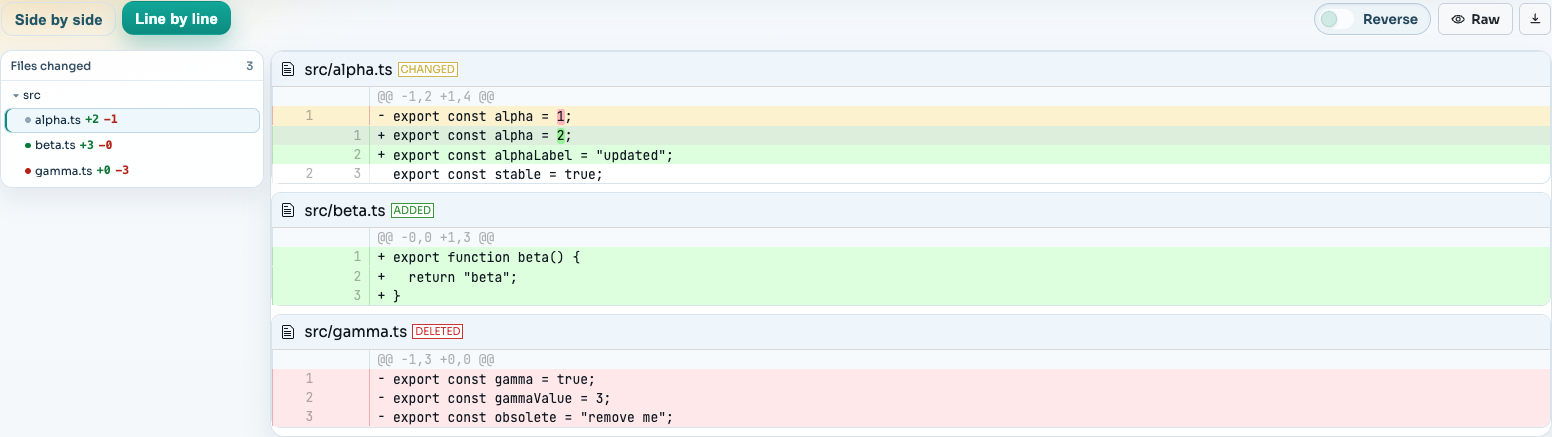
SharePatch accepts pasted unified diffs, uploaded files, and raw URLs, then provides file navigation and side-by-side or line-by-line views. The resulting link is unlisted, not access-controlled, so never upload credentials or confidential code.
For a comparison of repository reviews, attached patch files, Gists, browser viewers, and local tools, read how to share a Git diff.
Copy-and-keep summary
| Goal | Command |
|---|---|
| Unstaged changes | git diff |
| Staged changes | git diff --cached |
| All uncommitted changes | git diff HEAD |
| Latest commit | git diff HEAD~1 HEAD |
| Branch work since divergence | git diff main...HEAD |
| One path | git diff -- path/to/file |
| File summary | git diff --stat |
| Filenames only | git diff --name-only |
| Ignore whitespace | git diff -w |
| Whitespace errors | git diff --check |
| Save to file | git diff main...HEAD > review.diff |