You do not always need a pull request to ask someone to review a code change. Sometimes the reviewer cannot access the repository, the change came from a script, or you only need to discuss a work-in-progress patch in chat.
The best sharing method depends on three questions:
- Does the reviewer need the repository and its surrounding code?
- Can the diff leave your machine or company network?
- Does the result need comments and long-term history, or just a readable link?
This guide compares six practical ways to share a Git diff, including the trade-offs that are easy to miss.
First, generate the right diff
For unstaged working-tree changes:
git diffFor staged changes:
git diff --cachedFor everything on your current branch since it diverged from main:
git diff main...HEADThe three-dot form is usually what people want for branch review. It compares the merge base of main and HEAD with HEAD, so unrelated movement on main does not appear as part of your branch’s work.
Save any of these as a file by redirecting stdout:
git diff main...HEAD > feature-review.diffBefore sharing, scan the output for .env changes, credentials, customer data, generated files, and anything else that should not leave its current trust boundary.
Method 1: Send a .diff or .patch file
Attach the file to email, Slack, Teams, an issue, or another channel the reviewer already uses.
git diff main...HEAD > feature-review.patchThe extension does not change the content. Both .diff and .patch commonly contain unified diff text.
Best when: the recipient knows Git, the channel already handles files, or the patch must remain inside an approved system.
Trade-off: raw patch text is slow to scan, especially across many files. The recipient may need to apply it or open it in a dedicated diff tool.
Method 2: Use git format-patch
Use git format-patch when commits, authorship, commit messages, and patch-series order matter.
Create one patch for the latest commit:
git format-patch -1 HEADCreate a three-commit series:
git format-patch -3 HEADCreate a single mailbox file:
git format-patch --stdout -3 HEAD > feature-series.mboxBest when: contributing over a mailing list, preserving commit metadata, or sending a series that another developer will apply with git am.
Trade-off: it is more formal than a plain diff and can be confusing to reviewers unfamiliar with email-style Git workflows. See the full git format-patch guide for examples.
Method 3: Open a pull request
A GitHub, GitLab, or Bitbucket pull request is the default when the change belongs in a shared repository and needs line comments, approvals, automated checks, and durable history.
When a GitHub pull request already exists but someone needs the raw artifact, append .diff or .patch to its URL. The GitHub pull-request diff and patch download guide covers public URLs, private-repository API requests, and safe application commands.
Best when: the reviewer has repository access and the change is a real integration candidate.
Trade-off: creating a branch and pushing it is unnecessary overhead for generated patches, throwaway experiments, interview exercises, external suggestions, or changes that cannot go into the repository yet. A rebase can also make a latest-push compare view noisy; SharePatch can isolate what actually changed in a rebased PR update.
Method 4: Use a GitHub Gist
Create a Gist, name the file with a .diff or .patch extension, and GitHub will render basic diff coloring. Secret Gists are unlisted, not access-controlled.
Best when: everyone already uses GitHub and you want a quick URL with comments and revision history.
Trade-off: the view is basic, there is no side-by-side mode, and a secret Gist can still be opened by anyone who has its URL. GitHub explicitly describes secret Gists as unlisted rather than private.
Method 5: Use a browser-based diff-sharing link
A specialized tool turns unified diff text into a navigable browser view. In SharePatch, you can paste the diff, upload and edit a file, or import a raw URL. The result includes file navigation, side-by-side and line-by-line modes, reverse, raw, and download actions.
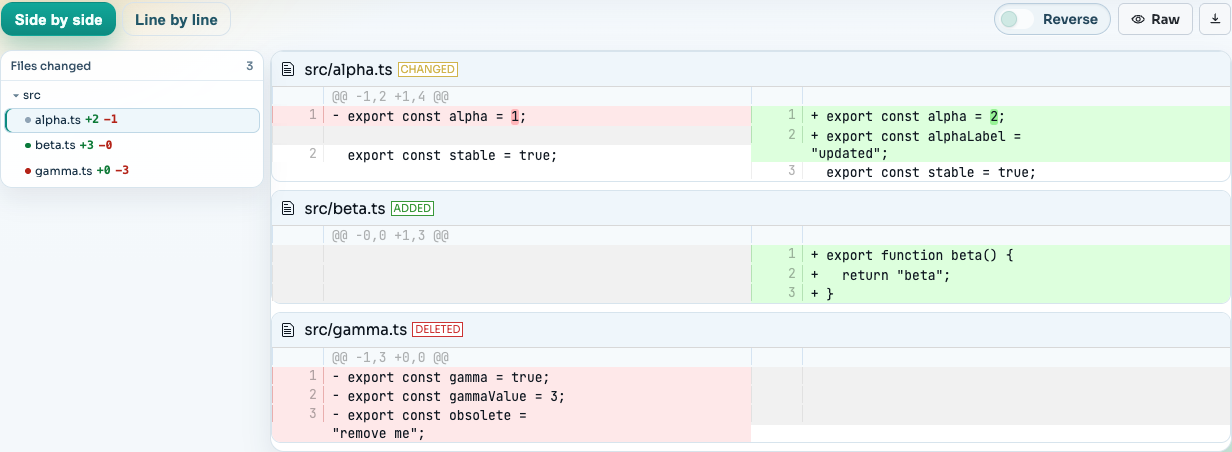
Best when: the reviewer needs a readable link but not repository access, or the patch came from CI, a code generator, an agent, a mailing list, or a support conversation.
Trade-off: the patch is uploaded so the link can work. SharePatch links are unlisted and excluded from search indexing, but they are not access-controlled. Do not use this route for secrets or code that cannot leave your environment.
If storage is unacceptable, use a client-side viewer such as DiffForge or a local renderer such as diff2html. The online Git diff viewer comparison covers those options in more detail.
Method 6: Render the diff locally
Local tools keep the content on your machine and are the safest default for restricted code.
Options include:
git diff --color-wordsfor a more compact terminal view- delta as a syntax-highlighted Git pager
- difftastic for syntax-aware structural diffs
diff2htmlfor a local HTML view- the diff editor built into VS Code, JetBrains IDEs, and other desktop tools
You can screen-share the rendered result or export an approved artifact.
Best when: the code cannot be uploaded or you need to review before deciding what may be shared.
Trade-off: the recipient does not get an interactive hosted copy unless you export and send one.
Quick decision table
| Need | Best starting point |
|---|---|
| Formal review, checks, and line comments | Pull request |
| Preserve commits and mailing-list metadata | git format-patch |
| Quick file transfer inside an approved channel | Attach .diff or .patch |
| Simple GitHub-hosted URL | Gist |
| Readable link without repository access | Browser diff-sharing tool |
| Code must stay local | Local diff viewer |
Recommended workflow
For ordinary repository work, use a pull request. For code that cannot leave your environment, render locally. For everything in between—generated diffs, external suggestions, support patches, and quick reviews without repository access—create a unified diff, inspect it for sensitive data, and share it through a purpose-built review link or an approved file channel.
The sharing mechanism should match the sensitivity of the content, not just the convenience of the reviewer.