A Git diff is readable as plain text, but an online diff viewer is faster when the change spans several files or you want a side-by-side review. You can paste the diff, upload a local .diff or .patch file, or import a public raw URL without cloning the repository.
This guide shows how to generate the right input, open it in a browser, choose a useful view, and share it safely.
Quick answer
To view uncommitted changes online:
git diff > changes.diffTo view staged changes:
git diff --cached > staged.diffThen open the free SharePatch Git diff and patch viewer, choose Upload and edit, select the file, and create the review. You can also paste the diff text directly or import a public raw URL.
What an online Git diff viewer adds
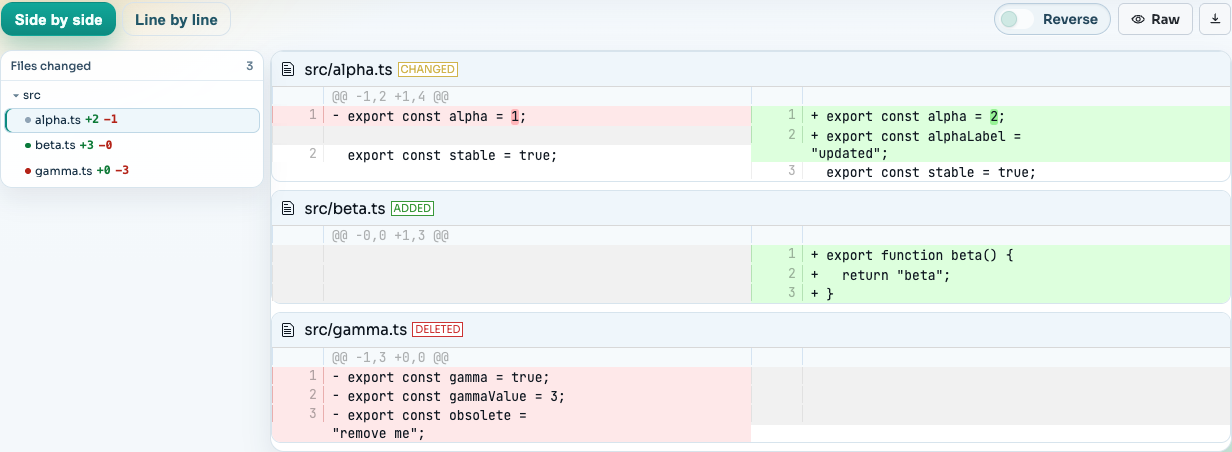
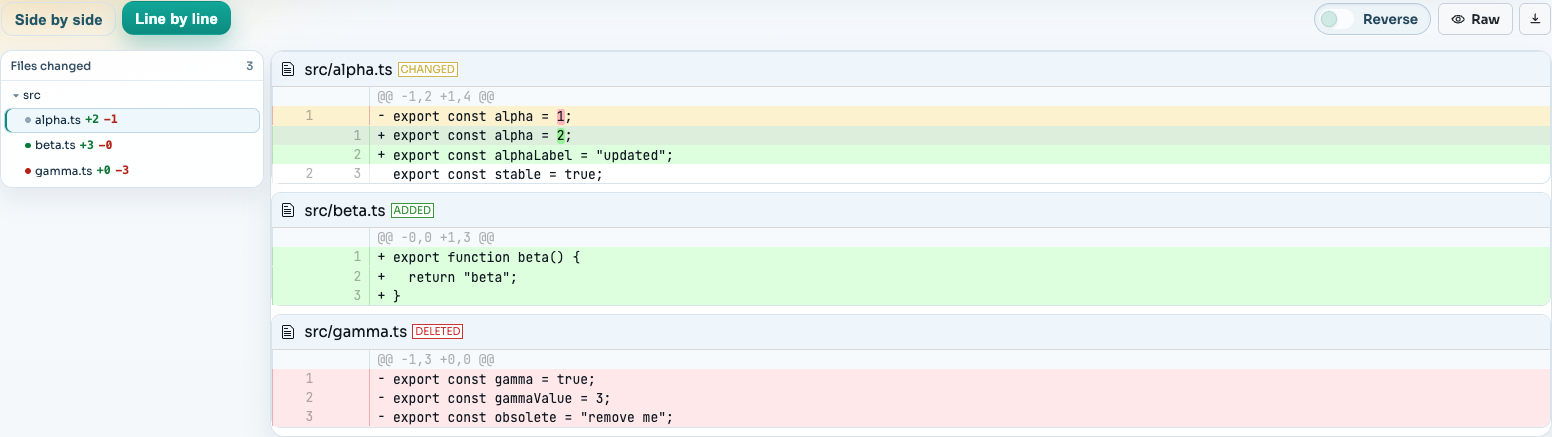
Raw unified diff text is compact and portable. A browser review surface adds structure around the same underlying patch:
- file navigation for multi-file changes
- side-by-side and unified line-by-line layouts
- syntax highlighting for easier scanning
- a reverse view for reading the change in the opposite direction
- raw and download actions for the original patch text
- a stable link for reviewers who do not have repository access
SharePatch does not replace a full pull request when you need inline comments, required approvals, status checks, or durable repository history. It is useful when the review artifact already exists as a diff and the reviewer mainly needs a clear browser view.
Generate the diff you intend to review
Choose the comparison deliberately:
# Unstaged working-tree changes
git diff > working-tree.diff

# Staged changes
git diff --cached > staged.diff

# Latest commit
git diff HEAD~1 HEAD > latest-commit.diff

# Changes introduced by a feature branch since its merge base
git diff main...feature-branch > feature.diff
Check the summary before uploading:
git diff --stat main...feature-branchUntracked files are absent from ordinary git diff output. Stage them first if they should be included. For a broader command reference, use the Git diff cheat sheet.
Method 1: paste a Git diff online
Paste mode is the quickest choice when the diff is already in your clipboard:
- Open SharePatch.
- Enter a concise name that tells the reviewer what changed.
- Keep the input mode on Paste.
- Paste the complete unified diff.
- Complete the human check and create the review.
Paste the file markers and hunk headers along with the changed lines. A useful unified diff normally contains markers such as:
diff --git a/src/example.ts b/src/example.ts
--- a/src/example.ts
+++ b/src/example.ts
@@ -1,2 +1,2 @@
-export const value = 1;
+export const value = 2;
Plain code snippets or two unrelated files are not a valid unified Git diff.
Method 2: open a .diff or .patch file
Use Upload and edit when the change is already saved locally:
- Choose the file input method.
- Select a
.diff,.patch,.mbox, or text patch file. - Inspect the text loaded into the editor.
- Create the review.
This works for ordinary git diff output as well as email-style git format-patch output. For the latter, SharePatch can separate the subject, author, recipients, commit message, and series context from the rendered code changes.
If you need to create the file first, follow how to create a Git patch file.
Method 3: view a diff from a URL
URL mode avoids downloading the file first:
- Copy a direct public URL that returns raw patch text.
- Choose URL in SharePatch.
- Paste the URL and create the review.
The URL must return raw text rather than an HTML preview or login screen. GitHub public pull requests support URLs ending in .diff and .patch; see how to download a GitHub pull request diff or patch.
Do not put authentication tokens in the URL. For private repositories, download the patch through an authenticated tool first, inspect it locally, and use an access-controlled review system if the code is confidential.
Review the diff in the browser
Start with Side by side when you want to compare old and new lines across a wide screen:
Switch to Line by line on a narrow screen or when you want additions and deletions in one continuous sequence:
For a multi-file patch:
- Scan the file list before reading individual hunks.
- Look for generated files, lockfiles, scripts, and configuration changes.
- Check that renames and deletions are intentional.
- Use the raw view if a rendered hunk seems incomplete or ambiguous.
- Download the original patch when you need to validate or apply it locally.
Validate a patch locally before applying it
A browser view helps with human review, but Git is the authoritative way to check whether a patch applies to a specific working tree.
For ordinary unified diff output:
git apply --stat changes.diff
git apply --check changes.diff
If the check succeeds:
git apply changes.diffFor email-style output created by git format-patch, apply with git am when you need to preserve commit metadata:
git am 0001-example.patchInspect and trust the change before applying it. A patch can modify dependencies, build scripts, hooks, CI workflows, and other executable project files.
Privacy: unlisted is not private
SharePatch review URLs are unlisted and excluded from search indexing, but they are not protected by authentication. Anyone with the URL can view the patch.
Before uploading:
- remove credentials, API keys, internal URLs, and personal data
- confirm the diff contains only the intended files
- avoid private source code that requires access control
- revoke any secret that was already committed or shared
Use an authenticated code host or internal review system when confidentiality matters.
When this workflow is useful
An online viewer is a good fit for:
- generated diffs from CI jobs or scripts
- a suggested fix that does not have its own branch
- reviewing a
.patchattachment from an issue or mailing list - opening a GitHub PR’s raw
.diffor.patchrepresentation - sharing a code change with someone outside the repository host
- quickly inspecting a patch before applying it locally
Use a pull request instead when the team needs inline discussion, checks, approvals, ownership rules, or a permanent merge record.
Common problems
The viewer rejects the text
The input may be a code snippet rather than a unified diff, or it may be truncated before the file headers and hunk markers. Generate it again with git diff and include the complete output.
A file is missing
Untracked files do not appear in ordinary git diff. Stage the file and export with git diff --cached, or commit it and generate a patch from the commit.
URL import returns an error
Open the URL directly and confirm it returns raw text with a successful HTTP response. Preview pages, expired artifacts, private URLs, and redirects to login pages are not raw patch endpoints.
The browser view differs from the target repository
The viewer renders the patch you supplied; it does not know whether the target branch has moved. Download the patch and run git apply --check against the intended base checkout.
Recommended workflow
For most browser-only reviews:
- Generate the smallest diff that answers the review question.
- Inspect its file summary locally.
- Upload the
.difffile or paste the raw text. - Review side by side, then check sensitive or executable files closely.
- Share the unlisted link only with people who should see the code.
If the goal is collaboration rather than viewing alone, compare six practical ways to share a Git diff.